在不同的网络基础上安装 Ambient 多主模式
按照本指南在 cluster1 和 cluster2 上安装 Istio 控制平面,
使每个集群成为主集群(这是目前 Ambient 模式下唯一支持的配置)。
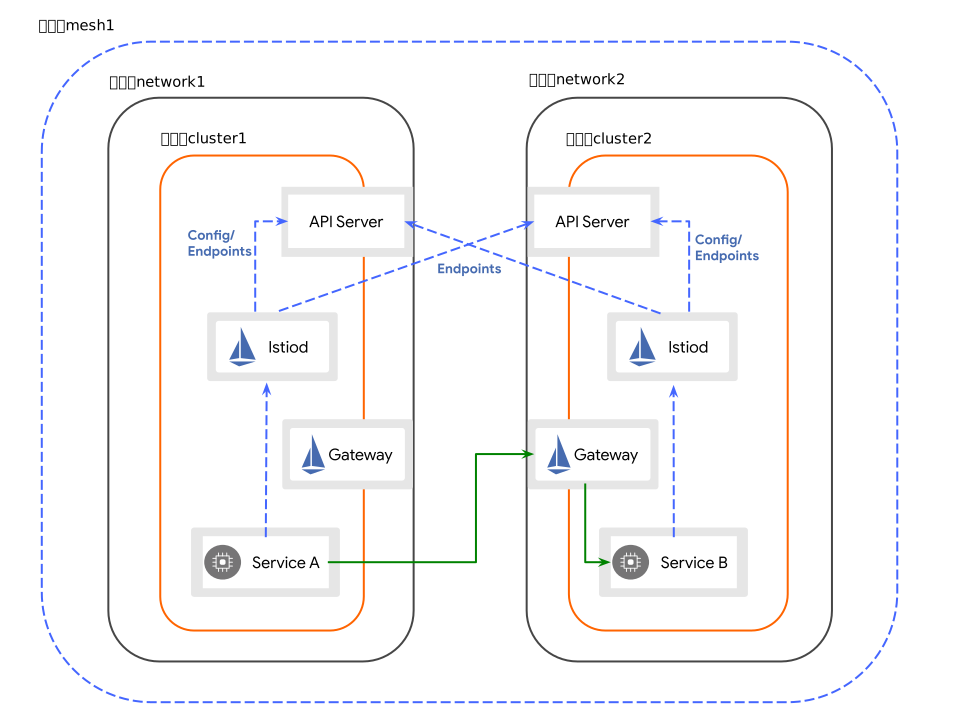
集群 cluster1 位于 network1 网络上,而 cluster2 位于 network2 网络上。
这意味着跨集群边界的 Pod 之间没有直接连接。
在继续之前,请务必完成开始之前下的步骤。
在此配置中,cluster1 和 cluster2 都会互相发现每个集群中的 API 服务器端点。
跨集群边界的服务工作负载通过专用网关间接通信, 用于东西向流量。 每个集群中的网关必须能够与其他集群互通。
设置 cluster1 的默认网络
如果 istio-system 命名空间已经创建,我们需要在那里设置集群的网络:
$ kubectl --context="${CTX_CLUSTER1}" label namespace istio-system topology.istio.io/network=network1将 cluster1 配置为主集群
为 cluster1 创建 istioctl 配置:
使用 istioctl 和 IstioOperator API 在 cluster1 中将 Istio 安装为主集群。
$ cat <<EOF > cluster1.yaml
apiVersion: install.istio.io/v1alpha1
kind: IstioOperator
spec:
  profile: ambient
  components:
    pilot:
      k8s:
        env:
          - name: AMBIENT_ENABLE_MULTI_NETWORK
            value: "true"
          - name: AMBIENT_ENABLE_BAGGAGE
            value: "true"
  values:
    global:
      meshID: mesh1
      multiCluster:
        clusterName: cluster1
      network: network1
EOF
将配置应用到 cluster1:
$ istioctl install --context="${CTX_CLUSTER1}" -f cluster1.yaml使用以下 Helm 命令在 cluster1 中将 Istio 安装为主集群:
在 cluster1 中安装 base Chart:
$ helm install istio-base istio/base -n istio-system --kube-context "${CTX_CLUSTER1}"然后,使用以下多集群设置在 cluster1 中安装 istiod Chart:
$ helm install istiod istio/istiod -n istio-system --kube-context "${CTX_CLUSTER1}" --set global.meshID=mesh1 --set global.multiCluster.clusterName=cluster1 --set global.network=network1 --set profile=ambient --set env.AMBIENT_ENABLE_MULTI_NETWORK="true" --set env.AMBIENT_ENABLE_BAGGAGE="true"接下来,在 Ambient 模式下安装 CNI 节点代理:
$ helm install istio-cni istio/cni -n istio-system --kube-context "${CTX_CLUSTER1}" --set profile=ambient最后,安装 ztunnel 数据平面:
$ helm install ztunnel istio/ztunnel -n istio-system --kube-context "${CTX_CLUSTER1}" --set multiCluster.clusterName=cluster1 --set global.network=network1在 cluster1 中安装 Ambient 东西向网关
在 cluster1 中安装一个专用于 Ambient 东西向流量的网关。
请注意,根据您的 Kubernetes 环境,此网关可能默认部署在公共互联网上。
生产系统可能需要额外的访问限制(例如通过防火墙规则)来防止外部攻击。
请咨询您的云供应商,了解有哪些可用的选项。
$ @samples/multicluster/gen-eastwest-gateway.sh@ \
    --network network1 \
    --ambient | \
kubectl --context="${CTX_CLUSTER1}" apply -f -使用以下网关定义在 cluster1 中安装东西向网关:
$ cat <<EOF > cluster1-ewgateway.yaml
kind: Gateway
apiVersion: gateway.networking.k8s.io/v1
metadata:
  name: istio-eastwestgateway
  namespace: istio-system
  labels:
    topology.istio.io/network: "network1"
spec:
  gatewayClassName: istio-east-west
  listeners:
  - name: mesh
    port: 15008
    protocol: HBONE
    tls:
      mode: Terminate # represents double-HBONE
      options:
        gateway.istio.io/tls-terminate-mode: ISTIO_MUTUAL
EOF将配置应用到 cluster1:
$ kubectl apply --context="${CTX_CLUSTER1}" -f cluster1-ewgateway.yaml等待东西向网关分配外部 IP 地址:
$ kubectl --context="${CTX_CLUSTER1}" get svc istio-eastwestgateway -n istio-system
NAME                    TYPE           CLUSTER-IP    EXTERNAL-IP    PORT(S)   AGE
istio-eastwestgateway   LoadBalancer   10.80.6.124   34.75.71.237   ...       51s
设置 cluster2 的默认网络
如果 istio-system 命名空间已经创建,我们需要在那里设置集群的网络:
$ kubectl --context="${CTX_CLUSTER2}" get namespace istio-system && \
  kubectl --context="${CTX_CLUSTER2}" label namespace istio-system topology.istio.io/network=network2
将 cluster2 配置为主集群
为 cluster2 创建 istioctl 配置:
使用 istioctl 和 IstioOperator API 在 cluster2 中将 Istio 安装为主集群。
$ cat <<EOF > cluster2.yaml
apiVersion: install.istio.io/v1alpha1
kind: IstioOperator
spec:
  profile: ambient
  components:
    pilot:
      k8s:
        env:
          - name: AMBIENT_ENABLE_MULTI_NETWORK
            value: "true"
          - name: AMBIENT_ENABLE_BAGGAGE
            value: "true"
  values:
    global:
      meshID: mesh1
      multiCluster:
        clusterName: cluster2
      network: network2
EOF
将配置应用到 cluster2:
$ istioctl install --context="${CTX_CLUSTER2}" -f cluster2.yaml使用以下 Helm 命令在 cluster2 中将 Istio 安装为主集群:
在 cluster2 中安装 base Chart:
$ helm install istio-base istio/base -n istio-system --kube-context "${CTX_CLUSTER2}"然后,使用以下多集群设置在 cluster2 中安装 istiod Chart:
$ helm install istiod istio/istiod -n istio-system --kube-context "${CTX_CLUSTER2}" --set global.meshID=mesh1 --set global.multiCluster.clusterName=cluster2 --set global.network=network2 --set profile=ambient --set env.AMBIENT_ENABLE_MULTI_NETWORK="true" --set env.AMBIENT_ENABLE_BAGGAGE="true"接下来,在 Ambient 模式下安装 CNI 节点代理:
$ helm install istio-cni istio/cni -n istio-system --kube-context "${CTX_CLUSTER2}" --set profile=ambient最后,安装 ztunnel 数据平面:
$ helm install ztunnel istio/ztunnel -n istio-system --kube-context "${CTX_CLUSTER2}" --set multiCluster.clusterName=cluster2 --set global.network=network2在 cluster2 中安装环境东西向网关
正如我们上面的 cluster1 中所做的那样,在 cluster2 中安装一个专用于东西向流量的网关。
$ @samples/multicluster/gen-eastwest-gateway.sh@ \
    --network network2 \
    --ambient | \
    kubectl apply --context="${CTX_CLUSTER2}" -f -
使用以下网关定义在 cluster2 中安装东西向网关:
$ cat <<EOF > cluster2-ewgateway.yaml
kind: Gateway
apiVersion: gateway.networking.k8s.io/v1
metadata:
  name: istio-eastwestgateway
  namespace: istio-system
  labels:
    topology.istio.io/network: "network2"
spec:
  gatewayClassName: istio-east-west
  listeners:
  - name: mesh
    port: 15008
    protocol: HBONE
    tls:
      mode: Terminate # represents double-HBONE
      options:
        gateway.istio.io/tls-terminate-mode: ISTIO_MUTUAL
EOF将配置应用到 cluster2:
$ kubectl apply --context="${CTX_CLUSTER2}" -f cluster2-ewgateway.yaml等待东西向网关分配外部 IP 地址:
$ kubectl --context="${CTX_CLUSTER2}" get svc istio-eastwestgateway -n istio-system
NAME                    TYPE           CLUSTER-IP    EXTERNAL-IP    PORT(S)   AGE
istio-eastwestgateway   LoadBalancer   10.0.12.121   34.122.91.98   ...       51s
启用端点发现
在 cluster2 中安装一个远程密钥,以提供对 cluster1 的 API 服务器的访问。
$ istioctl create-remote-secret \
  --context="${CTX_CLUSTER1}" \
  --name=cluster1 | \
  kubectl apply -f - --context="${CTX_CLUSTER2}"
在 cluster1 中安装一个远程密钥,以提供对 cluster2 的 API 服务器的访问。
$ istioctl create-remote-secret \
  --context="${CTX_CLUSTER2}" \
  --name=cluster2 | \
  kubectl apply -f - --context="${CTX_CLUSTER1}"
**恭喜!**您已成功在不同网络上的多个主集群上安装 Istio 网格!
下一步
您现在可以验证安装。
清理
使用与安装 Istio 相同的机制(istioctl 或 Helm)从 cluster1 和 cluster2 中卸载 Istio。
在 cluster1 中卸载 Istio:
$ istioctl uninstall --context="${CTX_CLUSTER1}" -y --purge
$ kubectl delete ns istio-system --context="${CTX_CLUSTER1}"
在 cluster2 中卸载 Istio:
$ istioctl uninstall --context="${CTX_CLUSTER2}" -y --purge
$ kubectl delete ns istio-system --context="${CTX_CLUSTER2}"
从 cluster1 中删除 Istio Helm 安装:
$ helm delete ztunnel -n istio-system --kube-context "${CTX_CLUSTER1}"
$ helm delete istio-cni -n istio-system --kube-context "${CTX_CLUSTER1}"
$ helm delete istiod -n istio-system --kube-context "${CTX_CLUSTER1}"
$ helm delete istio-base -n istio-system --kube-context "${CTX_CLUSTER1}"
从 cluster1 中删除 istio-system 命名空间:
$ kubectl delete ns istio-system --context="${CTX_CLUSTER1}"从 cluster1 中删除 Istio Helm 安装:
$ helm delete ztunnel -n istio-system --kube-context "${CTX_CLUSTER2}"
$ helm delete istio-cni -n istio-system --kube-context "${CTX_CLUSTER2}"
$ helm delete istiod -n istio-system --kube-context "${CTX_CLUSTER2}"
$ helm delete istio-base -n istio-system --kube-context "${CTX_CLUSTER2}"
从 cluster2 中删除 istio-system 命名空间:
$ kubectl delete ns istio-system --context="${CTX_CLUSTER2}"(Optional) Delete CRDs installed by Istio: (可选)删除 Istio 安装的 CRD:
删除 CRD 会永久移除您在集群中创建的所有 Istio 资源。 要删除集群中已安装的 Istio CRD,请执行以下操作:
$ kubectl get crd -oname --context "${CTX_CLUSTER1}" | grep --color=never 'istio.io' | xargs kubectl delete --context "${CTX_CLUSTER1}"
$ kubectl get crd -oname --context "${CTX_CLUSTER2}" | grep --color=never 'istio.io' | xargs kubectl delete --context "${CTX_CLUSTER2}"
最后,清理 Gateway API CRD:
$ kubectl get crd -oname --context "${CTX_CLUSTER1}" | grep --color=never 'gateway.networking.k8s.io' | xargs kubectl delete --context "${CTX_CLUSTER1}"
$ kubectl get crd -oname --context "${CTX_CLUSTER2}" | grep --color=never 'gateway.networking.k8s.io' | xargs kubectl delete --context "${CTX_CLUSTER2}"