Simplifying Egress Routing to Wildcard Destinations
Istio now supports wildcard ServiceEntry with DYNAMIC_DNS resolution, allowing sidecars to route traffic directly to wildcard HTTPS destinations while simplifying egress configuration.
Overview
Controlling egress traffic is a common requirement in service mesh deployments. Many organizations configure their mesh to allow only explicitly registered external services by setting:
meshConfig.outboundTrafficPolicy.mode = REGISTRY_ONLYWith this configuration, any external destination must be registered in the mesh using resources such as ServiceEntry with fully qualified domain names and a DNS resolution type.
apiVersion: networking.istio.io/v1
kind: ServiceEntry
metadata:
  name: external-wikipedia-https
  namespace: istio-system
spec:
  hosts:
  - "www.wikipedia.org"
  ports:
  - name: tls
    number: 443
    protocol: TLS
  location: MESH_EXTERNAL
  resolution: DNS
  exportTo:
  - "*"
However, some external services expose many dynamic subdomains where applications may need to access endpoints such as:
https://en.wikipedia.org
https://de.wikipedia.org
https://upload.wikipedia.org
As the list of hostnames grows, registering each one individually quickly becomes impractical to manage and scale. To address this, Istio needs support for wildcard hostname registration.
Why wildcard HTTPS egress is difficult
When a workload initiates an HTTPS connection, the destination hostname is transmitted in the TLS handshake via the Server Name Indication (SNI) field.
For example, a client calling https://en.wikipedia.org sends the hostname en.wikipedia.org in the ClientHello SNI field during the TLS handshake. Istio sidecars intercept outbound connections and determine whether the destination is registered and how it should be routed.
However, Istio’s routing model normally requires the upstream destination to be known ahead of time. Even if a wildcard match is used in routing rules, the final upstream cluster must still correspond to a statically configured service. Because different subdomains may resolve to different endpoints, routing directly to wildcard hosts was historically not straightforward.
SNI routing via Egress Gateway
This problem was previously addressed in the Istio blog post Routing egress traffic to wildcard destinations. The architecture included a dedicated egress gateway setup that worked as an SNI forward proxy.
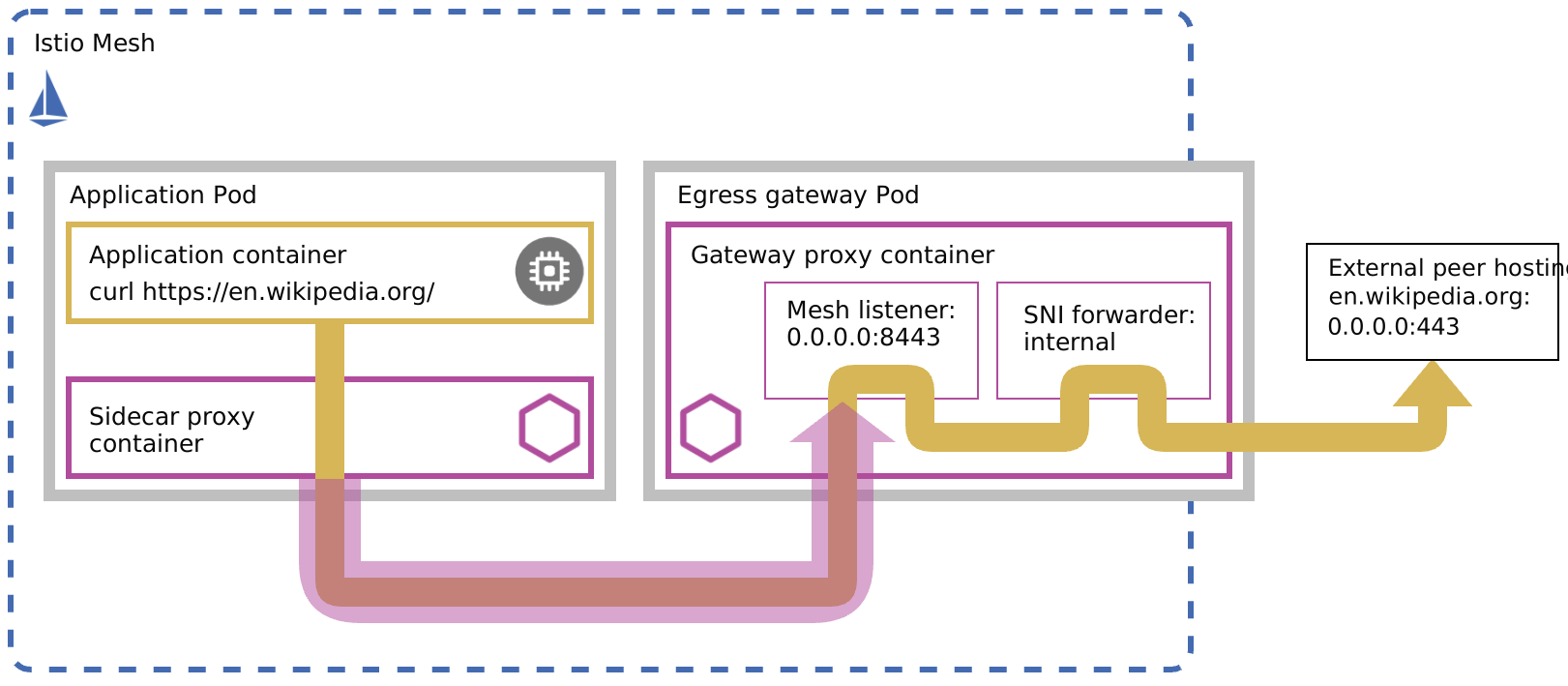
The diagram above was originally published in Routing egress traffic to wildcard destinations.
As shown above:
- The application initiates an HTTPS connection.
- The sidecar proxy intercepts this connection and initiates an internal mTLS connection to the egress gateway.
- The gateway terminates this internal mTLS connection.
- An internal listener inspects the SNI value from the original TLS handshake.
- Traffic is dynamically forwarded to the hostname extracted from SNI.
Implementing this required several custom resources:
ServiceEntryandVirtualServiceto forward wildcard domain traffic to egress gateway.DestinationRulefor mTLS between sidecars and the gateway.EnvoyFilterconfiguration that enables egress gateway to perform dynamic SNI forwarding, by far the most complex part of this solution. The filter extends the gateway using low-level Envoy capabilities by introducing three pieces: a patch to the gateway TCP proxy that routes traffic to an internal listener, an SNI inspector in the listener to extract SNI from TLS ClientHello, and a dynamic forward proxy cluster for performing dynamic DNS resolution of the SNI.
While this approach works, it introduces an additional network hop and an extra layer of internal mTLS for that hop. It also adds operational complexity due to the amount of custom configuration required, which can be difficult to manage and prone to errors. But recent improvements make it possible to achieve the same outcome with a much simpler configuration.
Wildcard ServiceEntry with DYNAMIC_DNS resolution
Istio now supports wildcard hostnames with DYNAMIC_DNS resolution in ServiceEntry, enabling sidecar proxies to route wildcard outbound TLS traffic directly without requiring an egress gateway.
For example, the following configuration allows access to all *.wikipedia.org endpoints:
apiVersion: networking.istio.io/v1
kind: ServiceEntry
metadata:
  name: external-wildcard-https
  namespace: istio-system
spec:
  hosts:
  - "*.wikipedia.org"
  ports:
  - name: tls
    number: 443
    protocol: TLS
  location: MESH_EXTERNAL
  resolution: DYNAMIC_DNS
  exportTo:
  - "*"
Once this resource is applied, workloads in the mesh can connect to any matching subdomain via this ServiceEntry.
$ kubectl exec $POD_NAME -n default -c ratings -- curl -sS -o /dev/null -w "HTTP %{http_code}\n" https://de.wikipedia.org && echo "Checking stats after request..." && kubectl exec $POD_NAME -c istio-proxy -- curl -s localhost:15000/clusters | grep "outbound|443||\*\.wikipedia\.org" | grep -E "rq|cx"

HTTP 200
Checking stats after request...
outbound|443||*.wikipedia.org::142.251.223.228:443::cx_active::0
outbound|443||*.wikipedia.org::142.251.223.228:443::cx_connect_fail::0
outbound|443||*.wikipedia.org::142.251.223.228:443::cx_total::3
outbound|443||*.wikipedia.org::142.251.223.228:443::rq_active::0
outbound|443||*.wikipedia.org::142.251.223.228:443::rq_error::0
outbound|443||*.wikipedia.org::142.251.223.228:443::rq_success::0
outbound|443||*.wikipedia.org::142.251.223.228:443::rq_timeout::0
outbound|443||*.wikipedia.org::142.251.223.228:443::rq_total::3
How the configuration works
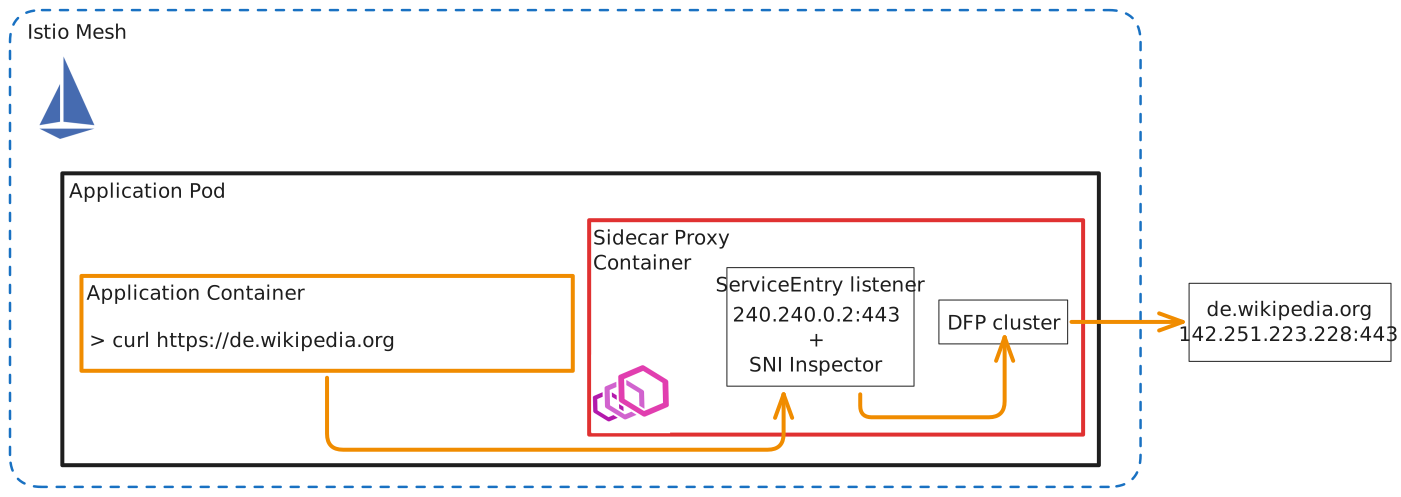
A wildcard ServiceEntry with resolution: DYNAMIC_DNS results in Istio creating a dynamic forward proxy (DFP) cluster that forwards TLS connections based on the hostname in the SNI field. The wildcard host (for example *.wikipedia.org) is first registered in the mesh service registry, allowing the sidecar to route outbound requests with hostnames matching the pattern. When a workload initiates a TLS connection, SNI Inspector in the listener is configured to read the SNI value from the handshake. The DFP cluster then uses it as the upstream hostname to forward the connection. This effectively enables wildcard HTTPS egress by allowing the proxy to dynamically resolve and forward connections to matching subdomains without requiring static endpoint configuration. All the while, it preserves the client-initiated TLS session, forwarding the encrypted traffic unchanged.
Other use cases
This approach is appropriate for use cases where applications need connectivity to wildcard domains while still getting mesh observability and resiliency features.
Egress traffic in Ambient mode
In ambient mesh, node-level ztunnel handles L4 traffic, and an optional waypoint proxy can apply L7 policy and telemetry when explicitly attached. To handle egress through a waypoint, for example to keep a consistent policy path for calls to many AWS service endpoints, the ServiceEntry can be labeled with istio.io/use-waypoint so the control plane directs matching traffic through the named waypoint Gateway.
The example below registers *.amazonaws.com as an external TLS (443) ServiceEntry and pins it to a waypoint gateway named waypoint:
apiVersion: networking.istio.io/v1
kind: ServiceEntry
metadata:
  name: amazonaws-wildcard
  namespace: istio-system
  labels:
    istio.io/use-waypoint: waypoint # attached to a waypoint gateway
spec:
  exportTo:
  - .
  hosts:
  - '*.amazonaws.com'
  location: MESH_EXTERNAL
  ports:
  - name: tls
    number: 443
    protocol: TLS
  resolution: DYNAMIC_DNS
Traffic to unknown internal destinations
A caller may only have a limited number of services in its config but still need mTLS connectivity to other internal services. The setup is:
- A
Sidecarresource that limits the ratings service egress hosts to theistio-systemnamespace, i.e., it cannot call the details service directly:
apiVersion: networking.istio.io/v1
kind: Sidecar
metadata:
  name: restrict-default
  namespace: default
spec:
  workloadSelector:
    labels:
      app: ratings
  egress:
  - hosts:
- "istio-system/*"ServiceEntrythat defines wildcard service for other internal services:
apiVersion: networking.istio.io/v1
kind: ServiceEntry
metadata:
  name: internal-wildcard-http
  namespace: istio-system
spec:
  hosts:
  - "*.svc.cluster.local"
  ports:
  - name: http
    number: 9080
    protocol: HTTP
  location: MESH_INTERNAL
  resolution: DYNAMIC_DNS
  exportTo:
- "*"DestinationRulethat defines mTLS configuration for thisServiceEntry:
apiVersion: networking.istio.io/v1
kind: DestinationRule
metadata:
  name: internal-wildcard-dr
  namespace: istio-system
spec:
  host: "*.svc.cluster.local"
  trafficPolicy:
    tls:
      mode: MUTUAL_TLS # needs DNS SAN in cert
  exportTo:
  - "*"
Ratings service can now call other services in the mesh, even though it doesn’t have them in its config, by resolving the hostname dynamically using DNS:
$ kubectl exec $POD_NAME -n default -c ratings -- curl -sS -o /dev/null -w "HTTP %{http_code}\n" details.default.svc.cluster.local:9080/details/0 && echo "Checking stats after request..." && kubectl exec $POD_NAME -c istio-proxy -- curl -s localhost:15000/clusters | grep "outbound|9080||\*\.svc\.cluster\.local" | grep -E "rq_total|rq_success"

Making test request...
HTTP 200
Checking stats after request...
outbound|9080||*.svc.cluster.local::10.96.35.238:9080::rq_success::1
outbound|9080||*.svc.cluster.local::10.96.35.238:9080::rq_total::1
Note: mTLS in this use case needs the certs to have DNS SANs since Envoy’s dynamic forward proxy leverages hostname to perform auto SAN validation.
Conclusion
Istio sidecar proxies can now directly handle HTTP and TLS egress traffic to wildcard domains with the introduction of wildcard ServiceEntry support and DYNAMIC_DNS resolution. This enables simpler configuration and a more direct request path, reducing latency by removing the need for an intermediate egress gateway hop, while still preserving the existing security and policy controls.
References


